WhatsApp link generator
In short
Type your number and an optional first message, and you get a wa.me link that opens a WhatsApp chat with you. You also get a QR code to print and a button for your website. Nobody has to save your number first.
- Free
- No sign-up
- Runs on your device
Updated 3 October 2026 · SimVala editorial
Example WhatsApp link
+44 7700 900123
https://wa.me/447700900123?text=Hi%2C%20I%20saw%20your%20flyer.%20Are%20you%20open%20on%20Sunday%3F
Hi, I saw your flyer. Are you open on Sunday?
Typed in the box, ready to send
Make your WhatsApp link
Made on your device, never sent or stored
Example from the film and TV range. Type your own number to replace it.
Made on your device. The number is never sent to us.
Your WhatsApp link
https://wa.me/447700900123?text=Hi%2C%20I%20saw%20your%20flyer.%20Are%20you%20open%20on%20Sunday%3F
QR code
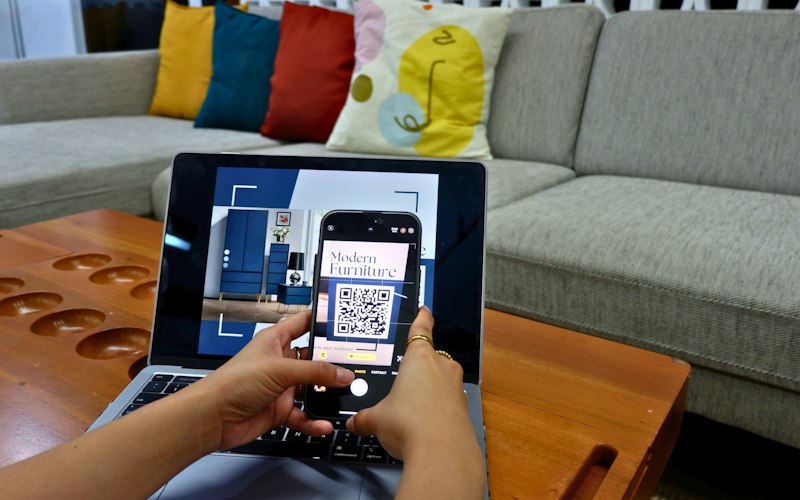
Print it on a flyer, menu or shop window. Scanning opens the chat.
Button code for your website
<a href="https://wa.me/447700900123?text=Hi%2C%20I%20saw%20your%20flyer.%20Are%20you%20open%20on%20Sunday%3F" target="_blank" rel="noopener">Chat on WhatsApp</a>
206
Countries in the picker
1 tap
From scan to an open chat
1,000
Characters allowed in the first message
0
Numbers stored
How a WhatsApp link is built
The format: https://wa.me/<number>?text=<message>. The number is written in full international form with no +, spaces, brackets or leading zeros. The generator does this for you.
The example link, part by part
https://wa.me/447700900123?text=Hi%2C%20I%20saw%20your%20flyer.%20Are%20you%20open%20on%20Sunday%3F
1The address
https://wa.me/
WhatsApp's own short web address for chats. It is a normal https link, so it works in any browser, app or email.
2Your number
447700900123
Country code first, then the number, with no +, spaces or leading 0. A UK 07700 900123 becomes 447700900123.
3First message (optional)
?text=Hi%2C%20I%20saw%20your%20flyer.%20Are%20you%20open%20on%20Sunday%3F
The words typed into the box for your visitor. Spaces become %20, commas %2C and line breaks %0A.
WhatsApp link examples for real situations
Same number, a different first message for each place. When a chat starts, the first line tells you which flyer, post or page brought that person in.
| Where you put it | First message | The link |
|---|---|---|
| Menu or table card | I would like to book a table for Friday. | https://wa.me/447700900123?text=I%20would%20like%20to%20book%20a%20table%20for%20Friday. |
| Instagram bio | Hi, I found you on Instagram. | https://wa.me/447700900123?text=Hi%2C%20I%20found%20you%20on%20Instagram. |
| Van or shop window | I need a quote for a leaking tap. | https://wa.me/447700900123?text=I%20need%20a%20quote%20for%20a%20leaking%20tap. |
| Email signature | None, the chat opens empty | https://wa.me/447700900123 |
Where a WhatsApp link earns its place
A wa.me link turns "save my number, then message me" into one tap. That is why it shows up on so many counters, bios and invoices.
- Shop counters and menusPrint the QR code on a table card or a receipt. Customers scan it to order, book or ask a question without typing your number.
- Social media biosInstagram and TikTok bios give you one or a few links. A wa.me link there sends followers straight into a private chat.
- Website contact pagesPaste the button code from the generator. On a computer, the link hands the chat to WhatsApp Web or the desktop app.
- Email signatures and invoicesA short "Chat on WhatsApp" line under your name gives clients a quicker way to reply than another email thread.
Add a first message to know where people came from
A prefilled message like "Hi, I saw your flyer" tells you which link brought the customer, and it makes the first step easier for them. They can still edit it before sending.
Keep it short and friendly. Emojis and line breaks work too. Leave out prices that may change and anything private, because the message sits in plain sight inside the link.
What happens on a computer
On a laptop, wa.me opens a WhatsApp page that passes the chat to the desktop app or to WhatsApp Web. If neither is set up, the page offers to download WhatsApp or to use WhatsApp Web, which links to the phone with a quick scan.
Older guides use api.whatsapp.com/send?phone=. It still opens the same chat, but wa.me is shorter and is the form WhatsApp's own help pages show.
Put your WhatsApp QR code on paper
Download the PNG
Press Download PNG under the QR code. The picture is 480 pixels wide, plenty for a table card or a flyer.
Print it at least 2 cm wide
Tiny codes are hard for phone cameras to read. Keep a white border around it and avoid shiny paper.
Scan it before you print 100
Test with two phones. The chat should open with your first message already typed in the box.
Keep your personal number out of it
A public WhatsApp link shows your phone number to everyone who opens it. For a business, a shop or a public profile, register WhatsApp on a second number and keep your personal one private.
A second phone number gets sign-up codes and calls, so you can register WhatsApp on it and share the link freely. Need only the code? A one-time SMS code number costs less than a dollar.
Links for other apps
Writing the message too? The WhatsApp text formatter adds bold, italics, lists and quotes.
More free tools
All tools FormatterWhatsApp text formatterBold, italic, strikethrough, lists and quotes, with a live preview.
 LookupPhone number lookupWhich country, mobile or landline, the area code and the local time.
 GeneratorFake phone number generatorOfficial fictional numbers for tests, screenshots and films. They reach no one.
 CheckerScam text checkerPaste a suspicious text and see its red flags, like fake toll or parcel messages.
Sources
- WhatsApp Help Center: how to use click to chat
- Ofcom: numbers kept for TV and drama (the example number)
Link format checked on 2026-10-03. SimVala is not affiliated with WhatsApp.
WhatsApp links, answered
How do I create a WhatsApp link?+
Use the format https://wa.me/ followed by your full international number with no + or spaces, like https://wa.me/447700900123. The generator above builds it for you, with an optional first message and a QR code.
Does the other person need to save my number?+
No. The link opens a chat with you straight away, on the phone or on WhatsApp Web.
Can I add a message to a WhatsApp link?+
Yes. Add ?text= and your message, encoded for web addresses. The generator handles the encoding, including spaces, emojis and line breaks.
Why does my wa.me link say the number is not on WhatsApp?+
Usually the number is written wrongly: a + sign, a leading 0 or a missing country code. Or WhatsApp is not registered on that number yet.
Can I make a WhatsApp QR code?+
Yes. The generator draws a QR code for your link that you can download as a picture and print. Scanning it opens the chat.
How is this QR code different from the one inside WhatsApp?+
The code in WhatsApp's settings adds you as a contact, and you can reset it if it leaks. This one opens a chat and can carry a first message. It never expires, so print it only for a number you plan to keep.
Can I make a WhatsApp link without a number?+
Yes. https://wa.me/?text= followed by a message opens WhatsApp with the text ready, and the person picks who to send it to. It suits "share this" buttons.
Is the WhatsApp link generator free?+
Yes, and it runs on your device. Your number is never sent to us.
A second number for WhatsApp
Share a link without sharing your personal number. Real numbers in 200+ countries, paid in crypto. No card, no email, no ID.