Crypto payment QR code generator
In short
Make a QR code people can scan to pay you, with the amount built in. Pick the coin and network, paste your address and download the picture. The tool checks the address matches the network you picked, so nobody pays to the wrong chain.
- Free
- No sign-up
- Runs on your device
Updated 3 October 2026 · SimVala editorial
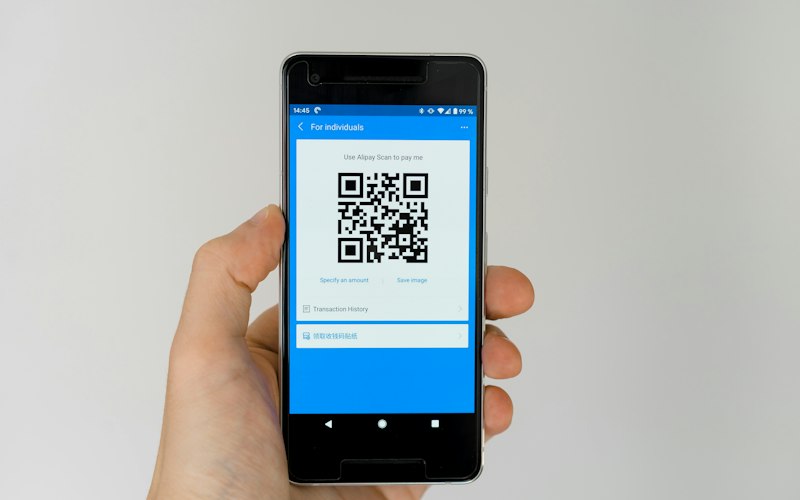
Example result
BIP-21 Bitcoin
0.001 BTC
Address matches network
bitcoin:1A1zP1eP5QGefi2DMPTfTL5SLmv7DivfNa?amount=0.001&label=Example%20shop
Make a payment QR code
Drawn on your device, never sent or stored
This is an example address, not yours. It belongs to Bitcoin's first block, and coins sent there are lost forever. Clear it and paste your own address before you share a QR code.
Made on your device. Nothing is sent to us.
Your QR code appears here
Pick the coin, then paste your address.
13
Coins and networks
8
Blockchains covered
11
Can carry the amount
0
Addresses stored
What is inside a crypto payment QR code
A payment QR code is a short piece of text drawn as black and white squares. The text is a payment link. It starts with the coin's name, then the address, then extras like the amount. When someone scans it, their wallet opens with everything filled in. They only check and press send.
A plain address in a QR code works too, but then the sender has to type the amount. Typing is where mistakes happen: a missing zero turns 0.01 into 0.1. A payment link removes that step.
The QR code does not hold any coins and cannot take money from anyone. It is just a way to pass text from one screen to a camera without typing.
BIP-21, EIP-681, Solana Pay and Monero links, explained simply
Each blockchain agreed on its own way to write a payment link. They look different, but they all do the same job. This tool writes the right one for the coin you pick, so you never have to learn the rules.
- BIP-21: Bitcoin, Litecoin, DogecoinThe oldest and simplest. The link is the coin name, a colon, the address, then ?amount= in whole coins. Litecoin and Dogecoin copy the same pattern with their own names.
- EIP-681: Ethereum and BNB Smart ChainAdds the chain number after an @ sign: 1 for Ethereum, 56 for BNB Smart Chain. For USDT or USDC, the link points at the token's contract and says who to send to and how much.
- Solana Pay: SOL and USDT on SolanaLooks like BIP-21 but starts with solana:. For a token like USDT it adds spl-token= with the token's ID, so the wallet sends USDT and not SOL.
- Monero links (monero:)Monero's version uses tx_amount= for the amount and recipient_name= for the label. Monero addresses are long, about 95 characters, so a QR code saves a lot of typing.
Which wallets read which crypto QR code
Almost every wallet reads the address part of a payment link. Reading the amount and the token is where wallets differ. Here is what the main wallets for each coin support.
| Standard | Coins | Wallets that read it | Amount in the QR |
|---|---|---|---|
| BIP-21bitcoin:bc1q...?amount=0.001&label=Shop | Bitcoin, plus litecoin: and dogecoin: in the same style | Nearly every Bitcoin wallet: Electrum, Sparrow, BlueWallet, Trust Wallet, Exodus | Yes |
| EIP-681ethereum:0x...@1/transfer?address=0x...&uint256=... | ETH, BNB, and USDT or USDC on Ethereum or BNB Smart Chain | MetaMask mobile and Trust Wallet read it. Some wallets read only the address | Yes, in most wallets |
| Solana Paysolana:...?amount=10&spl-token=Es9v... | SOL, and USDT on Solana | Phantom, Solflare, Backpack | Yes |
| Monero URImonero:4...?tx_amount=0.1&recipient_name=Shop | Monero (XMR) | Cake Wallet, Monerujo, Feather, the official Monero wallet | Yes |
| Address onlyTXyz... (the address, nothing else) | TRX, and USDT on Tron (TRC-20) | Any Tron wallet, like TronLink or Trust Wallet | No, the sender types it |
Wallets change with every update. Before you print a QR code for a shop, test it with a small payment from the wallet your customers use.
How to take a crypto payment with a QR code
Pick coin and network
Choose exactly what you want to receive. USDT on Tron and USDT on Ethereum are different, and need different addresses.
Paste your address
Copy it from your own wallet's receive screen. The tool checks it fits the network and its checksum, so a typo is caught.
Add the amount
Optional. Type it in whole coins, like 0.001 BTC or 25 USDT. The tool turns it into the units each standard needs.
Download and share
Save the PNG, show it on a screen or print it. Ask the sender to check the last few characters of the address before paying.
Watch out for swapped QR codes
Printed QR codes can be covered with a sticker that points to someone else's wallet. If you put a payment QR code in public, check it now and then, and ask customers to confirm the last characters of the address in their wallet before paying.
The same trick happens on screens. Malware can swap a copied address for the attacker's one. Reading the first and last four characters out loud takes five seconds and stops both tricks.
Want to be sure an address is on the right network first? Paste it into the crypto address checker. Already sent to the wrong one? Read what to do after sending crypto on the wrong network.
Where a payment QR code helps
- A shop counter or market stallPrint one code per price, or one with no amount so the buyer types it. Laminate it so a sticker cannot be pressed on easily.
- Invoices and billsPut a code with the exact amount on a PDF invoice. The client scans it from the screen with their phone.
- Donations and tipsA code with no amount on a website or a stream lets people give what they like.
- Stablecoins on 5 networksUSDT and USDC codes name the token contract, so the wallet sends the stablecoin and not the chain's own coin.
Paying SimVala in crypto? You do not need a QR code of your own: checkout shows the address and amount for the coin you pick. Bitcoin is on-chain only, and no fee is added on top. See paying with crypto.
More free tools
All tools CheckerCrypto address checkerWhich network a wallet address belongs to, with a typo check.
 Live dataUSDT network feesWhat sending USDT costs on Tron, Ethereum, BNB Chain, Polygon and Solana, right now.
 ConverterSats to USD converterSatoshis, Bitcoin and dollars at the live price.
 ConverterGwei converter and gas feesGwei, wei and ETH to dollars, plus a gas fee calculator.
Sources
- BIP-21: Bitcoin payment links
- EIP-681: Ethereum payment requests
- Solana Pay specification
- Monero project: URI formatting
Standards checked on 2026-10-03. Wallet support for amounts varies; the sender should always check.
Crypto QR codes, answered
How do I make a Bitcoin QR code?+
Pick Bitcoin above, paste your receiving address and, if you like, an amount and a label. The QR code follows the BIP-21 standard, so wallets read the amount too. Download it as a picture.
Can a QR code include the amount?+
For Bitcoin, Ethereum, BNB Smart Chain, Solana and Monero, yes: the amount is part of the payment link. Tron has no common standard, so its QR code holds the address and the sender types the amount.
Is a USDT QR code different from an ETH one?+
Yes. A USDT payment link names the USDT contract and the network, so the wallet sends USDT on the right chain. Pick the exact coin and network you want to receive.
Is it safe to share my wallet QR code?+
A receiving address is meant to be shared, so yes. Never put a recovery phrase or private key in a QR code.
Does this tool store my address?+
No. The QR code is drawn in your browser, and nothing is sent to us.
Why did the wallet not fill in the amount?+
Some wallets read only the address part of a payment link and skip the rest. This is most common with Ethereum token links. The sender should type or check the amount before paying.
Whose address is in the example?+
It is the address from Bitcoin's very first block, which anyone can look up. Coins sent there can never be moved again, so do not pay it. Clear the example and paste your own address.
Can I make a Lightning QR code here?+
No. This tool makes on-chain payment links only. Lightning invoices are made by a Lightning wallet for each payment, and they expire.
Spend your crypto on a phone plan
Travel eSIM data and real phone numbers, paid in Bitcoin, Monero, USDT and more. No card, no email, no ID.